


Kooply Run™: Play and Create!
4.1281.00 Reviews
App Specs
- Version
- 2.195
- Updated On
- License
- Free
- Downloads
- 50,000,000+
- Developer
- KOOPLY
- Categories
- Arcade
- Platform
- Android, iOS
Screenshots




 Analysis by AppCompare
I like the idea behind Kooply Run™: Play and Create!: it treats an arcade runner as something you can both play and make, rather than a set of courses you simply finish. That shift matters if you enjoy trying a quick challenge, then wondering how you might build one yourself. I’d approach it as a casual game with a creative layer, not as a full game-development tool, and that distinction helps set the right expectations from the start.
What free access does—and doesn’t—tell you
The game is free to install, so you can try its central play-and-create idea without paying an upfront purchase price. It also offers in-app purchases, with listed items ranging from $0.49 to $99.99 each. That is a wide spread, so I would check the price of any specific item in the store before buying rather than assuming every purchase is small or necessary.
Free access is a useful starting point, but it is not the same as knowing exactly how much of the experience is available without spending. I wouldn’t treat the presence of purchases as a reason to avoid the game, nor would I assume they are required to enjoy it. My practical advice is to begin with the free experience, see whether the basic loop holds your attention, and only consider a purchase if you understand what it adds and genuinely want it.
Why the create-and-play mix has value
Many arcade runners focus on replaying a developer-made course, chasing a better run, or unlocking another piece of content. Kooply Run offers a different reason to return: you can move between playing levels and making your own. That makes the creative side more than a decorative extra. A level can be a challenge you tackle, but it can also be a small design experiment you adjust and share.
That combination suits short sessions especially well. I can imagine opening the game while waiting for an appointment, playing a few user-made stages, then saving a rough idea for a level rather than committing to a long campaign. It also gives friends a more specific activity than simply comparing scores: one person can make a course, another can try to work out its obstacles, and then they can swap roles.
Where the tradeoffs show up
There is a natural tension between a quick arcade game and a creation tool. Players who only want a polished sequence of increasingly difficult stages may find level-making unnecessary, while creators who expect deep editing controls may want more precision than a mobile-focused game can comfortably offer. The appeal depends on enjoying both the act of running through a level and the process of shaping one.
Sharing also changes what you get from the game. Community-made levels can keep play feeling varied, but their quality will depend on the individual creator. I’d be ready to encounter stages that are more interesting as experiments than as finely balanced challenges. If you prefer a tightly curated arcade experience, a conventional runner with a fixed progression may be a better fit; if you like discovering odd ideas and testing them, that unpredictability is part of the point.
Worth Reading Before You Choose

Flipboard Shows What News Apps Must Do Beyond the Feed

Switching to Android Auto Means Rethinking Your Driving Routine

Google Calendar Makes a Crowded Week Easier to Manage

Ludo King Makes the Most of the Minutes Between Plans

Baby Panda World Brings Quick Play to Modern Phones, but Its Game Library Feels Busy

ESPN’s Live Game View Makes Following Close Games Easier
Getting Started with Kooply Run
First things first, downloading Kooply Run™: Play and Create! is a breeze. A quick trip to the App Store or Google Play, and you're set. The installation process is quick, so you won’t have to endure long waits. Once it's on your device, you're greeted by a vibrant, welcoming interface that’s as intuitive as it is engaging.
The Gameplay Experience
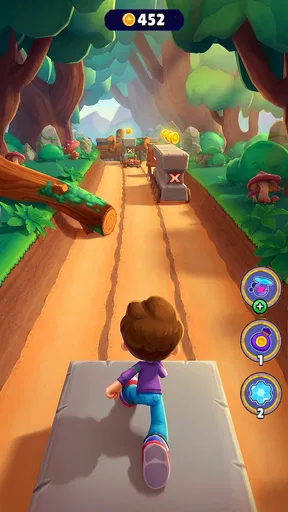
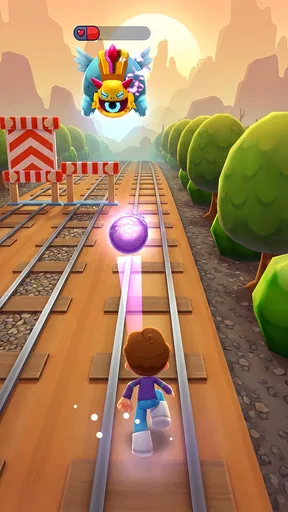
Jumping into the game, you’ll notice how easy it is to navigate. The controls are straightforward, making it accessible for players of all ages. You start by choosing a character and then embark on various missions that test your skills. The graphics are crisp and colorful, adding a nice touch to the overall experience.
The real charm of Kooply Run lies in its variety of levels. Each level presents unique challenges that keep you on your toes. Whether you're dodging obstacles or collecting power-ups, the game keeps you engaged without feeling repetitive.
Unleash Your Creativity
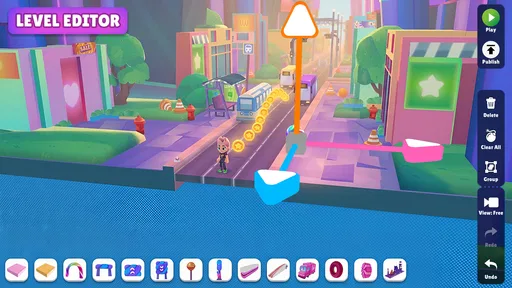
Now, here’s where Kooply Run really stands out: the creation mode. This feature lets you design your own levels. It’s like having a mini game development studio right in your pocket. The tools provided are robust yet user-friendly, allowing for a seamless creation process.
You can share your creations with friends or explore levels made by others. This adds a community-driven aspect to the app, encouraging creativity and collaboration. The possibilities are endless, and there’s something incredibly satisfying about seeing your ideas come to life.
Community and Social Features
Speaking of community, Kooply Run doesn’t skimp on social features. You can connect with friends, challenge them to beat your scores, or collaborate on new levels. There’s a leaderboard to fuel a bit of friendly competition, and you can even join groups to meet like-minded creators.
The app regularly hosts events and contests, which is a great way to keep the community active and engaged. It’s clear that the developers are committed to fostering a vibrant user base.
Wrapping It Up
Overall, Kooply Run™: Play and Create! is a delightful blend of gaming and creativity. It offers a refreshing break from the typical app experience, allowing you to not just play, but also create and share. Whether you're a casual gamer or someone with a creative flair, this app has something for you.
So, if you're looking for an app that offers both fun and creative freedom, give Kooply Run a shot. It's a fun, engaging way to spend your time, and who knows, you might just discover a new passion for level design!
Ready to dive into the world of Kooply Run? Download it now and start creating!
A practical way to try the editor
If I were testing the creator for the first time, I’d start with one simple idea rather than trying to build a long, elaborate course. Pick a single obstacle or a clear sequence of hazards, then play the level yourself before sharing it. That small test is useful because a layout that looks clever while editing may feel confusing at runner speed. Making one change at a time also helps you see which parts actually improve the challenge.
For a friend-made level, I’d agree on a small goal before starting: for example, make a short course that is tricky but fair, then take turns trying it. This gives the creator feedback that is more useful than a vague “that was hard.” If a player gets stuck at the same point, the designer can decide whether that difficulty is intentional or whether the layout needs another pass.
Who is likely to enjoy it most?
The strongest match is someone who likes arcade movement but doesn’t want every session to be about beating a fixed track. Younger players and families may appreciate the approachable premise, while creative players can treat level building as a low-pressure way to explore how obstacles and pacing affect a run. The age rating is Everyone, and KOOPLY is the developer behind the game.
It is also a sensible choice for people who enjoy sharing small projects. You don’t need to think of yourself as a designer; making a playful course for a friend is a perfectly good reason to use the editor. On the other hand, if your main goal is a deep story, a serious competitive ladder, or a highly technical creation suite, I’d look elsewhere. The game’s appeal is the blend, not an attempt to replace those more specialized experiences.
How it fits among arcade alternatives
Compared with a standard endless runner, the most meaningful difference is the possibility of creating and sharing levels, rather than only repeating a preset run. That can make the game feel more personal, but it also means the experience may vary with the stages you choose. A conventional runner is often the simpler pick when you want a consistent, immediately familiar challenge with no interest in editing or community content.
Compared with a dedicated level editor, this is the more approachable direction: the creative activity sits alongside an arcade game instead of being the whole purpose. That’s a trade-off, not a flaw. I’d choose this when I want to play first and experiment casually; I’d choose a specialized creation tool if exact control, complex systems, or a more formal design workflow mattered more than quick play.
Details that help set expectations
The game sits in the arcade category, has an average rating of 4.3 from around 202,000 ratings, and has passed 50 million installs. Those figures suggest that it has found a broad audience, but they don’t tell me whether I’ll enjoy a particular user-made level, so I’d judge it by trying the actual play-and-create loop. It was released on March 14, 2024, and version 2.179 lists Android 6.0 as the minimum operating system requirement.
If you’re choosing between playing alone and involving friends, I’d start solo to learn how a level feels, then share a creation once you have something you’re comfortable with. That avoids making a first experiment feel like a performance. And if you’re deciding whether to spend, there’s no need to treat a purchase as the entry ticket: the game is free, while optional in-app items have their own prices. Try the core experience first, then decide whether any particular paid item offers value to you.
My buy-or-skip verdict
I’d recommend giving it a try if you want a free arcade game that leaves room for making and sharing your own challenges. Its best value is not simply another run; it’s the chance to turn a spare moment into a small design idea and then see how someone else handles it. The combination is especially appealing for friends or family members who enjoy taking turns and comparing approaches.
I’d skip it if you want a purely hands-off runner, dislike user-created content, or expect a professional-grade editor. For those players, a more focused arcade game or dedicated creation app will likely be a better match. For everyone else, the sensible approach is straightforward: install it, explore a few levels, try a modest design, and spend only if a specific purchase clearly feels worth it to you.
Pros
- Intuitive interface for easy game creation.
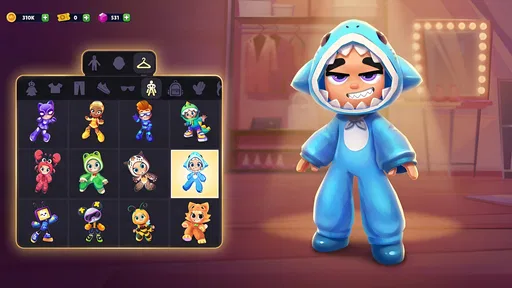
- Diverse character customization options.
- Engaging multiplayer mode available.
- Frequent updates with new features.
- Cross-platform support enhances accessibility.
Cons
- Occasional in-app purchase prompts.
- Some levels may load slowly.
- Limited offline functionality.
- Advertisements can be intrusive.
- Advanced tools can be complex for beginners.
FAQs for Kooply Run™: Play and Create!
What is Kooply Run™: Play and Create! and how does it work?
Kooply Run™: Play and Create! is an innovative mobile game that combines endless running with customizable level creation. Players can enjoy pre-made levels or unleash their creativity by designing unique courses using the app’s intuitive tools. You can challenge friends or join a global community to share and explore user-generated content, making each playthrough unique and engaging.
Is Kooply Run™ free to download and play?
Kooply Run™: Play and Create! is free to download on both Android and iOS platforms. While the core gameplay is accessible without cost, the app offers optional in-app purchases. These purchases can enhance your experience by providing access to premium features, exclusive design tools, or cosmetic items for character customization. However, they are not necessary to enjoy the game fully.
What are the device requirements for Kooply Run™?
To ensure a smooth gaming experience, Kooply Run™: Play and Create! requires a minimum of Android 8.0 or iOS 12.0 and above. The app is optimized for newer devices with sufficient RAM and processing power. Users with older devices may experience slower performance or occasional crashes, so it's recommended to check compatibility before downloading.
Can I play Kooply Run™ offline?
Kooply Run™ offers both online and offline modes. Offline, you can enjoy pre-downloaded levels and work on designing your own courses. However, to access community features such as sharing levels, competing in global leaderboards, or downloading new user-created content, an internet connection is required. This dual functionality ensures you can enjoy the game anytime, anywhere.
How does the level creation feature work in Kooply Run™?
The level creation feature in Kooply Run™ is designed to be user-friendly and accessible to players of all skill levels. Using drag-and-drop mechanics, you can place various obstacles, platforms, and power-ups to craft unique challenges. The app provides a wide array of customizable options, allowing for endless creativity. Once completed, you can test your levels and share them with the community.


